ReleaseNotes/27.2
TDF LibreOffice Document Liberation Project Community Blogs Weblate Nextcloud Redmine Ask LibreOffice Donate

About this Page
Writer
- New compatibility flag enabled by default: "Use better line spacing". Placing the gap below the line produces a more balanced, aesthetic look, is more consistent, and improves interoperable with Microsoft formats. Many line spacing bugs were also fixed. (Justin Luth) tdf#172113 tdf#137335 tdf#164835

- Lots of find/replace paper-cuts fixed: Improve replacement in tracked changes. Implement regex search for '^' (the start of the paragrah). Fixed searching for attributes in general, and specifically for finding page breaks, page styles, highlight colour, font colour, underlined text, and hidden text. Stopped clearing all formatting during format ‘Replace All’. Many UI improvements (like repopulating the replacement text) and much more. (Justin Luth) tdf#36582 tdf#135538 tdf#135857 tdf#158011 tdf#74078 tdf#161182 tdf#164402 tdf#120098 tdf#170738 tdf#151688
- Better feedback for substituted and replaced fonts. (Heiko Tietze, TDF) tdf#61134, tdf#151121, tdf#173606
-
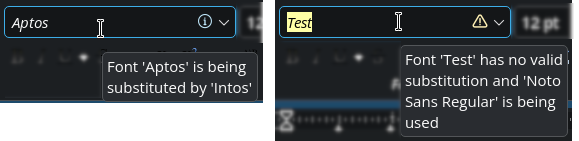 Font substitution and replacement

- The Special Character dialog now includes a baseline indicator in its glyph preview. (Andreas Heinisch) tdf#90848
-
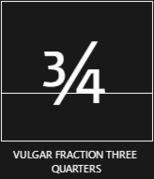 Glyph previews now include the baseline (the invisible line where letters sit).

- Templates: MediaWiki template is now better integrated. (Laurent Balland) tdf#167472
Calc
- Lots of find/replace paper-cuts fixed: prevent data/style corruption, recognise single-cell selections, etc. (Justin Luth) tdf#128435 tdf#163888 tdf#111843 tdf#84136 tdf#160781
- Add an hamburger button in navigation tabbar (access to first, previous, next, last tab and add tab) to show the list of all visible sheets. A new expert option enables to restore the previous behavior (no list button, but right click on New sheet button to show the list)
org.openoffice.Office.Calc > Layout > Other > TabbarSheetsListButton(Laurent Balland) tdf#171207
-
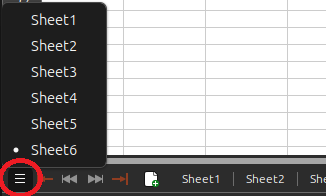 New button to show the list of sheets

- Add Go to Sheet command in context menu of sheet tabs, if there is more than 1 visible sheet. (Laurent Balland) af745380
- Navigation with Home and Ctrl + Home in sheets with frozen rows and/or columns now works in two steps. The first press moves the cursor to the first column/row after the frozen area. Pressing it again moves the cursor on to column A or cell A1. Within the frozen area, the cursor moves directly to column A or cell A1. Hidden, merged or protected cells at the freeze line are skipped. (Andreas Heinisch) tdf#173894
- If ▸ ▸ command selects hidden sheets, an InfoBar warns user that some hidden sheet are selected in addition to the visible ones. A button deselects these hidden sheets. The InfoBar can be disable with a button on the InfoBar itself, and through a new expert option
org.openoffice.Office.UI > Infobar > Enabled > HiddenSheetsSelected. (Laurent Balland) tdf#173835
-
 InfoBar to warn user when hidden sheets are selected

- With expert option
org.openoffice.Office.Calc > Input > SelectHiddenSheets, it is now possible, when selecting sheets with ▸ ▸ , to choose whether hidden sheets are additionnaly selected (true= default) or only visible ones (false). (Laurent Balland) tdf#173835 - The search options of the Function Wizard are now available in a menu next to the search field. Besides the similarity search, the new option "Search in descriptions" also lists functions where the description contains the search text. These matches are listed after all function name matches. In addition, short function names like N or T are no longer found in almost every search, both in the Function Wizard and in the Functions sidebar deck. (Andreas Heinisch) tdf#171886
New functions
- Added LAMBDA function (Ben Urban) tdf#138749
- Added ISOMITTED function (Ben Urban) tdf#164510
- Added BYCOL function (Ben Urban) tdf#164508
- Added BYROW function (Ben Urban) tdf#164509
- Added MAKEARRAY function (Ben Urban) tdf#164511
- Added MAP function (Ben Urban) tdf#164512
- Added REDUCE function (Ben Urban) tdf#164513
- Added SCAN function (Ben Urban) tdf#161428
- Added ARRAYTOTEXT function (Tomaž Vajngerl, Collabora) 21b9909a
Impress
- Show the dimension of slides in Side Pane > Properties > Slide > Format, as a tooltip, in addition to the ratio. (Laurent Balland) tdf#171940
-
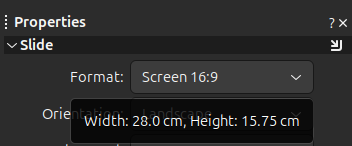 Tooltip showing the Slide dimension

Draw
Duplicate dialog
The "Duplicate" dialog has got new options to use HSL color model for calculating the fill color of the copies. (Regina Henschel) 28341a69
-
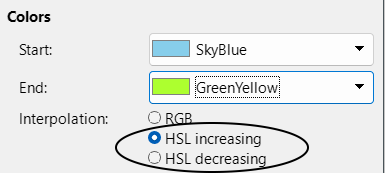 Screenshot of the new settings

Using the settings shown in the screenshot and creating 8 copies the result will look like this:
-
 Copies with HSL color interpolation

Cross-fading
Cross-fading can now handle solid transparency and attributes set by style . Thereby fill or line "none" is treated as 100% transparent. (Regina Henschel) tdf#173018 tdf#173025
-
 old cross-fading
-
 improved cross-fading


Base
Chart
- Added Correlation circle graph type (Dennis Francis, Collabora) b0b4bad0
-
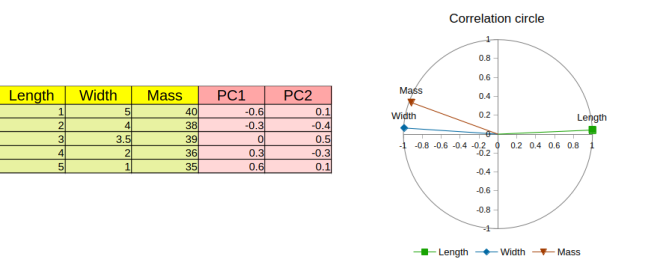 Correlation Circle Chart

Math
Core / General
Filters
JPEG XL
- Added support for importing JPEG XL images (Jesus Solis) tdf#156931
User Interface
Accessibility
Changes in UI strings
Scripting
Python
Services that implement XInvocation can now be used from Python. For example the VBA API can now be used to conveniently fill the selection in Calc:
createInstanceWithContext("ooo.vba.excel.Application", ctx).Selection.Value = "x"(Neil Roberts, TDF) tdf#173114
Android Viewer
Localization
LibreOffice Help
Help contents upgrades and fixes:
Feature Removal / Deprecation
- Obsolete Sheherazade font (v.2.100, SIL) is no longer bundled. Note: In case you still need these fonts, they can be downloaded from our site. Alternatively, you can try to migrate to Sheherazade New font, it can be downloaded from SIL site. (Xisco Faulí, TDF) tdf#171533
Platform Compatibility
Support for x86 (32-bit) Windows builds is removed.
API Changes
The “select” method of Writer document controllers can now accept a Sequence<Any> containing XTextRanges. For example this makes it possible to select all footnotes in Python with a very short macro:
def selectAllFootnotes():
    doc = XSCRIPTCONTEXT.getDocument()
    doc.getCurrentController().select(list(doc.getFootnotes()))
(Neil Roberts, TDF) tdf#172967